Counters in, plumbing back on
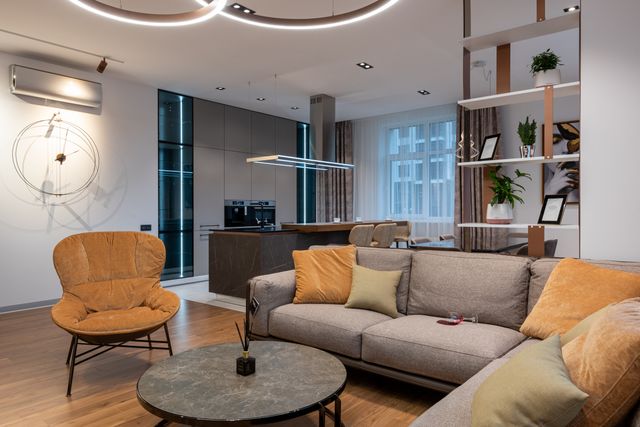
Aug 12Quartz counters went in this morning and the island sink is back on. Full photo set below.
Posted from the job site
We can't find the internet
Attempting to reconnect
Something went wrong!
Attempting to reconnect
Obra prices the estimate from your own costs, reads the receipts your crew sends by WhatsApp, email or photo, and shows cost against budget on every job the same day, while there's still time to fix it.
Best for crews whose receipts arrive from the field, often over WhatsApp, in English or Spanish. Free for one project, then $12 per user a month.
Every receipt feeds one number
$171,100
Every cost. Live. On every project.
Seen the day it's spent, not after the job closes.
Illustrative numbers
Four ways in. One review queue. Zero typing. The AI reads amount, vendor, date, category and tax — a human confirms with one tap.
Each crew member links their own number. Snap → send → filed on the right project, sender attached. If they can text, they're trained. In English or Spanish, whichever they speak.
A private address per organization. Forward supplier invoices and PDFs; they queue up next to the photos.
In-app quick capture, installable on the home screen, built for one hand and gloves.
Hand a receipt to Claude or ChatGPT, or ask how the Westlake job is doing. It reads your real numbers and files into the same queue — nothing skips review.
Nothing posts itself. Extractions wait for approval — routed by custom roles, so the office keeps control.
Take a photo of a receipt and watch your project's numbers update — no typing.
 Play the demo
Every dollar in context: project, category, vendor, currency. Totals stay bucketed per currency — never silently mixed.
Illustrative numbers
Price the work from what your own jobs actually cost, send it as a PDF the client can read and accept, and bill it back from the same numbers. The quote you signed and the money you collect stay one chain — no second spreadsheet to keep in step.
Build the estimate line by line, with your own cost history and closed-job totals beside it — or say the job out loud, in the editor or in a WhatsApp voice note, or add a photo of the space, and let Obra write the scope and draft the lines. Thin on history? A reference price gets you moving — labeled as a reference, never passed off as your cost.
One press turns the issued version into a PDF and a private client link you can email. They read it, download it, and accept or decline from that page — what the work costs you never appears on it.
One press turns an accepted estimate into the job: the project opens with its contract value and its category budgets already set from the quote. The numbers you quoted stay as the original plan, so you can read quoted against actual while the job is still running.
Deposits, progress draws, the accepted estimate, or the extras already sitting in your ledger. Obra keeps you from billing past the contract, corrects an issued document with a credit note, and shows what's outstanding by age.
Cash flow, cash results by project and by client, category budgets, portfolio averages — every chart computed from real receipts, live. The numbers below are illustrative.
Collected − recorded
$171k
+$41k vs last quarter
Active projects
12
3 finishing this month
Receipts captured
1,284
Zero typed by hand
Avg project duration
14
Weeks, contract to close
Cash collected Recorded cost
Hover a month for exact figures
$171k collected − recorded cost
Spend by category · this quarter
Who actually pays the bills
Westlake Remodel · watch marks at 80% and 100%
SPEC-01
USD, MXN, EUR — bucketed per currency, never silently converted.
SPEC-02
Approved extras adjust the contract; the original survives.
SPEC-03
Watch marks at 80%, overrun alerts in your Monday digest — you see it coming.
SPEC-04
Crew captures, office approves. You decide who sees contract values.
SPEC-05
Cash results by client. Spend by vendor. Context on every dollar.
SPEC-06
Your trade's language, preset at onboarding. Scanning uses the same list.
SPEC-07
Filtered CSVs or the whole organization as a ZIP of CSVs. No lock-in, ever.
SPEC-08
PWA with a home-screen quick-capture shortcut. No app store required.
SPEC-09
Cash collected, recorded cost, budget alerts — weekly, by email.
SPEC-10
Every screen, every WhatsApp reply and the Monday digest in the language each person picks. Office in English, crew in Spanish — same project, same numbers.
Publish a public page per project — before & after, milestones, updates. Send one link. Win the next contract.
 Before
After
Before
After
Timeline
Latest update
Quartz counters went in this morning and the island sink is back on. Full photo set below.
Posted from the job site
Type two numbers from any job you're on right now and see what's left after costs — no account, no email. Obra keeps that number live for every project, free.
Left after costs
—
% of contract left
—
Obra keeps these numbers live for every project — from your contract value and every recorded cost.
Track your numbers freeAll prices in USD
Free
Pro
It puts every cost on the job it belongs to — materials, labor, subs, permits, equipment — so you can compare what a job is costing with what you estimated while the job is still running, not after the last invoice. Obra adds the capture: the crew sends receipts by WhatsApp, email or photo, the AI reads them, and the figures land on the right project the same day.
While adding a transaction, attach a photo or PDF of the receipt or invoice. Obra reads it and extracts the amount, date, vendor, sales tax and a category matched against your own category list, then prefills the transaction form. Supported formats: JPG, PNG, WebP, HEIC and PDF — PDFs are scanned up to 5 MB, and larger files still attach to the transaction.
Yes. Link your WhatsApp number from Settings, then send photos or PDFs of your receipts to Obra's number. Every organization also gets its own private email address you can forward invoices to. Each one arrives already scanned as a draft in your Receipts inbox, waiting for you to confirm it into a transaction — and every transaction remembers whether it came from WhatsApp, email or your own typing.
Nothing is saved without your review. The scan only fills fields you haven't typed in, and you can change any value before saving. Think of it as a very fast first draft.
Yes. Your costs and income are visible only to you and your team. Even if you publish a project to your public portfolio, financial details are never shown. We don't run ads or sell data — see our Privacy Policy for the details. Privacy Policy
Yes. Each project has its own currency, and totals stay bucketed per currency — Obra never silently converts or mixes them.
Yes. Log every approved extra — or deduction — with its date, description, amount and an optional attachment. Obra adjusts the project's contract value while keeping the original value visible, so you always know what you signed for, what changed and who logged it.
Yes. Price an estimate from your own cost history, then send it as a PDF with a private client link — the client reads it and accepts or declines from that page. One press then turns the accepted estimate into the job, and the project opens with its contract value and category budgets already set. Bill it back with deposits, progress draws, the estimate itself or extras from your ledger; Obra keeps you from billing past the contract, corrects an issued document with a credit note, and shows what is outstanding by age. Clients still pay you however they do today — Obra records the payment against the document. Mexican organizations issue payment requests; Obra does not stamp CFDI.
Not yet. Obra is the field side: receipts, estimates, invoices and the live figures on each job. For the books, every category carries an accounting classification and an account code, any filtered list exports as a CSV, and the whole organization exports as a ZIP of CSVs that lists every receipt with its download link, so a bookkeeper maps a month in one pass. How Obra and QuickBooks fit together
Yes. Obra is built around organizations: invite teammates and everyone works from the same projects, clients and categories.
Yes. Obra is fully bilingual, English and Spanish. Each person picks their own language, so the office can keep the books in English while the crew sends receipts and reads WhatsApp replies in Spanish. Help articles, guides and the Monday digest come in both languages too.
Pro costs $12 per user per month, or $120 per user per year. Sending an invitation is free — a seat is only added to your bill once someone accepts it, and it stays counted (even while that member is suspended) until they are removed. If people join or leave mid-cycle, the difference is prorated onto your next invoice automatically, so you never pay for a seat nobody is using.
Yes. Connect the assistant you already use — Claude, ChatGPT or a coding agent — and ask how a job is doing, send in a receipt, or record an expense from the conversation. It only sees what your own role allows, it can never delete, approve or pay anything, and you can revoke it from Settings at any time. Assistant connections are part of Pro, and the 14-day trial includes them.
Every account starts with 14 days of Pro — the full feature set, no credit card, with 300 receipt scans and 50 AI estimate requests for your organization during the trial. When it ends you simply continue on the Free plan: one active project, one published project page, 20 receipt scans and 3 AI estimate requests a month. Drafting lines from a scope, categorizing the lines you typed and the what's-missing check each spend one request. Nothing is deleted or hidden — your other projects become read-only until you upgrade or make room, and you choose which one stays active. Teammates are paused rather than removed, so upgrading brings everyone back exactly as they were.
Cancel anytime from your account settings — no phone calls, no retention flows. You keep Pro until the end of the period you already paid for, so download a structured export (CSV files) before then if you want a copy. After that you continue on the Free plan with everything you created intact, and you can delete your organization and account right from Settings. support@tryobra.com is there if you need a hand.
Obra installs straight from your browser on iPhone and Android — no app store, no download. Add it to your home screen and it opens full screen like any other app, with a shortcut that jumps right to adding an expense while you're still standing at the counter.
Obra is available in English and Spanish today, with more languages on the way. You can switch language anytime from the menu.
More questions? Visit the Help Center
A ready-made spreadsheet to track costs and income per project — with categories and the totals already set up.
Prefer to work in the browser? Try the free tools
Set up your first project in two minutes. Free forever for one project — no credit card.
Start tracking free